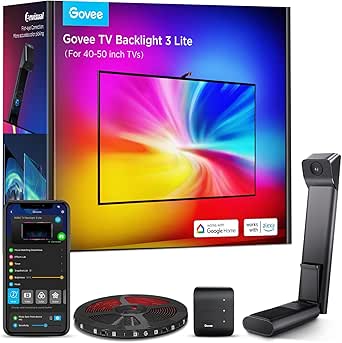
Quick Verdict
Owners of 40–50 inch TVs who want better warm whites and multi-device lighting sync
Manufacturer gives feature names (fish-eye correction, upgraded chip) but no measurable specs or camera details
Solid option for the targeted TV size if you accept limited technical transparency.
Technical Specifications
| Intended TV Size | 40–50 inch TVs |
| Strip Length | 7.8 ft (as listed) |
| LED Type | RGBICW (4-in-1 lamp bead: RGB + warm white) |
| Syncing | Govee DreamView, up to 7 sub-devices |
| Mounting | Camera with gravitational hanging design; adhesive option |
Pros
- Includes warm-white chip for more natural white tones
- Designed specifically for 40–50 inch TVs and supports multi-device sync
Cons
- Key specs (LED density, camera resolution) are not provided
- Performance claims like "fish-eye correction" lack measurable details
Introduction
Govee's "TV Backlight 3 Lite" pitches a cleaner, more accurate ambient backlight for 40–50 inch TVs using an RGBICW strip and a small camera. The marketing leans on phrases like "upgraded chip" and "fish-eye correction," so expect a product that tries to solve common LED-backlight problems (color accuracy along edges, warm whites, easy mount). I'll stick to what's stated and point out where the marketing skips hard data.
Key Features (Analyzed)
• Designed for 40–50 inch TVs: The product listing explicitly targets that screen range. If your TV is outside that bracket, the fit and mapping may be suboptimal.
• 7.8 ft RGBICW strip: "RGBICW" means each lamp bead includes red/green/blue + an extra warm white chip. That should produce better warm-white tones than RGB-only strips. The description also claims improved pixel density but does not provide numeric density (LEDs per foot) or pixel count, so we don’t know how granular the color mapping actually is.
• Fish-eye correction function: Govee claims an upgraded chip enables "fish-eye correction" to expand the effective range and improve color matching along edges. That sounds useful for corner distortion from the camera, but the listing gives no technical detail or measurements, so treat it as a software calibration feature rather than a guaranteed fix for all mounting setups.
• Camera with gravitational hanging design: The camera is described as hanging (and you can stabilize it with adhesive). The mounting approach is targeted at ultra-thin TVs. No camera resolution, framerate, or privacy details are provided in the description—so you get a camera that captures screen colors, but you shouldn’t assume anything beyond that.
• Govee DreamView syncing: You can add up to 7 sub-devices to sync lighting effects of the 3 Lite for a 360° immersive effect. Useful if you have multiple Govee lights, but no detail on latency or how well sync holds during fast scenes.
• Full compatibility for any TV content: The listing claims it can "instantly capture the color of any TV screen" for matching. That’s the intended operation, but again there’s no specification on capture latency, minimum ambient light, or how it handles HDR or ultra-fast scene changes.
• Smart activation and app/voice control: Works with Govee Home app and supports Alexa and Google Assistant for voice commands. The app includes features like black bar elimination, blank screen detection, and various scene modes.
Practical Pros & Cons
Pros
• Reasonable target range: specifically designed for 40–50 inch TVs, so you know if you’re in the intended use case.
• Better white tones: the extra warm-white chip (the "W" in RGBICW) should give more natural whites than RGB-only strips.
• Camera mounting thought-through: gravitational hanging plus adhesive option aims to simplify mounting on thin TVs.
• Ecosystem syncing: DreamView lets you sync multiple Govee devices (up to 7) for a fuller room effect.
Cons
• Vague performance claims: "Upgraded chip" and "fish-eye correction" are mentioned without numbers, so you can’t objectively compare to other models.
• Missing camera specs: no resolution, privacy, or streaming details given—only that it captures screen color.
• Pixel density unspecified: the listing says "improved pixel density" but provides no LED count or pixel per segment info, which matters for accurate edge mapping.
• Limited to 40–50 inch TVs: that’s precise and helpful, but it also rules out slightly larger or smaller TVs unless you accept imperfect coverage.
Final Verdict
This Govee TV Backlight 3 Lite looks like a pragmatic mid-range solution if you have a 40–50 inch TV and want better warm whites and ecosystem syncing without digging into technical specs. The camera-based mapping and fish-eye correction are reasonable features on paper, but the manufacturer doesn’t publish the measurements or camera specs that would let you verify how well those features perform in edge cases.
If you value clear, measurable specs (LED/pixel count, camera resolution, latency) or want to use the strip on a TV outside the 40–50 inch range, the product description leaves too many questions unanswered. If you want a straightforward, app/voice-controlled backlight with warm-white capability and multi-device syncing for the specified TV size, this is worth considering.
Quick Verdict: Decent, practical backlight for 40–50" TVs with improved whites and sync options—just don’t expect detailed technical transparency.
FAQ
Q. Will this work on TVs outside 40–50 inches?
A. The product is listed for 40–50 inch TVs. It may function on other sizes but coverage and mapping accuracy are not guaranteed by the listing.
Q. Does the listing provide camera specifications?
A. No. The description mentions a camera and mounting style but does not provide resolution, framerate, or privacy details.
Q. Can I control the lights via voice?
A. Yes—manufacturer states compatibility with Alexa and Google Assistant, and control via the Govee Home app.
Q. How many devices can sync together?
A. Up to 7 sub-devices can be added to sync lighting effects using Govee DreamView, per the product description.
As an Amazon Associate, I earn from qualifying purchases.


Comments